
Becoming
VR photography exhibition | Lead Developer | Colourless Creative | 2025 to 2026
Becoming is a VR photography exhibition for Meta Quest 3. Visitors explore nine apartments in a Soviet-era block in Riga, each built around a photography project about personal transformation and filled with interactions of its own. It was made for the public, with many of them trying VR for the first time, and explores the idea that becoming is an ongoing process of change.
Platform
Meta Quest 3 and 3S
Input
Hand tracking only
Engine
Unity 6 (URP)
Team
Led a team of 20
Premiere
Riga, 800+ visitors
My contributions to Becoming
Leading the team
-
Led development for a team of 20, with four programmers reporting directly to me, from kick-off to a public premiere 19 months later.
-
Defined the project's technical foundations, setting the project structure, coding standards, guidelines and training material that kept it free of major merge conflicts and overwritten scenes.
-
Owned the GitHub repository and trained the whole team in Git, artists included, with no lost work in 19 months.
-
Designed a scene structure built on top-level prefabs so several people could work in the same scene at once.
-
Planned the roadmap and ran two-week sprints with weekly scrums on Trello, keeping a part-time team aligned through to launch.
-
Mentored the junior developers through the mechanics they built and fostered an open culture where the team asked questions early and brought work in for feedback.
-
Scaled performance testing across the team with a testing guide and process, so anyone with a headset could capture profiling data.
-
Onboarded and trained a second cohort of 10 developers and artists when the team doubled mid-project.




Building the tech
-
Took performance from crashing to a verified 72fps in every scene, profiling builds on device with the Unity Profiler, Memory Profiler and OVR Metrics Tool.
-
Built the hand-tracking and navigation systems in C# with the XR Interaction Toolkit, reworking the teleport anchors after user testing so first-time VR users could navigate unaided.
-
Designed most of the room mechanics and led their cross-disciplinary development, building core interactions and animation systems in C#.
-
Lit every scene for high visual quality at Quest frame rates, with fully baked lighting, reflection probes, a custom volumetric sunbeam shader and per-room URP post-processing.
-
Led QA, user testing and bug fixing, using per-room analytics and on-device performance data to drive improvements.
-
Owned builds and deployment: split the app into an APK and OBB to get past Meta's 1 GB limit, and set up five Quest 3S kiosks with Horizon Managed Services for the nine-day premiere, which ran without a crash.
-
Designed the scene-loading architecture: a persistent Master scene with additive floors and apartments, and an interactive lift that doubles as a 3D loading screen.


The nine apartments
Nine unique apartments, built in parallel with the photography to elevate each project's artistic intent. Explore a Soviet-era block to find a room flipped onto its own ceiling, another lined with clocks and a hot pink bedroom falling apart.

#Instagirl
Spray the walls and the photos. Then try not to look away

World Untouched By Men
Craft a flower crown,
and put it on your head

Fading Feast
The cake is yours to smash,
and to throw

Shell
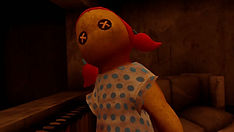
A doll you can hold.
Sounds you can't place

Tick Tack
Every clock keeps time. Every hour, a little faster

FacesFacesFaces
Don't turn your back on the statues

The End is a Beginning
Fish from the bathtub, unlock the chest, then make a collage in mid-air

Twins
The room is mirrored on the ceiling, now paint the cracks gold

Molded by Society
Count the mannequins.
Now count again

Spraypaint
Doll

Fishing

Painting
Designing for first-time VR visitors

Imagine putting on a VR headset for the first time. How do you know what to do?
Becoming starts with a tutorial I designed outside the apartment block: a series of steps that teach you to move, grab, open doors and use the lift with your hands, and you can't go on until you've done each one.
If you can finish the tutorial, you can play every room.



Hand tracking only
To help new users settle into VR quickly and keep queues moving at exhibitions, we chose hand tracking over controllers. No button layouts to explain, no batteries to swap, no controllers to clean between users. This decision then shaped every interaction that followed.
Choosing how to move
I built a test scene with three locomotion options and had the team try them all. Teleport areas often misfired with hand tracking: reach for an object, point at the floor, and you've teleported by accident. Smooth locomotion needed a joystick and risked motion sickness. Teleport anchors won easily, so I built the navigation around them with the XR Interaction Toolkit.
Feedback before committing
Hand tracking means there are no buttons to click, and new users often can't tell whether their hands are being tracked. So every target responds before you pinch: anchors change colour, stairs glow blue, and doors swing open with a warm glow and a sound, giving users vital feedback on where they're aiming.
Bigger than they look
Testers kept missing the teleport anchors with their hands. A better tutorial helped, but the real fix was the target itself: bigger icons, colliders twice their size, and the XR Interaction Toolkit snapping the pointer to the centre. Nobody noticed, but the complaints about movement stopped.
Anchors as gates
Users kept grabbing objects from across the room and starting interactions too early. So I turned teleport anchors into gates: interactions only switch on once you're standing next to them. For example, the fishing rod stays locked with physics off until you teleport into the bathroom, which also saves performance.
Show, don't tell
Testers found building the flower crown from eight pieces frustrating, and pieces often fell under the table. So I started with six pieces already assembled, meaning users only had to add the last two. The half-built crown shows them exactly what they're making, with no instructions needed. I reused this same trick in Twins, where some cracks start pre-painted in gold to show what the brushes are for.
Comfort over realism
To sell the illusion of the lift moving, early iterations had the lift shaking. Internal testing, however, showed the shaking wasn't necessary and actually increased motion sickness. Therefore, I removed the shake animations and let the gap between the doors do the work: users can see the shaft sliding past, so they still feel the lift moving up and down.

Lighting for Meta Quest
How do you light nine rooms, each with its own mood, on a headset that runs on a mobile chip?
Bake everything and fake the rest.
I led the lighting, and midway through development, I trained up our Lead Artist so that we could light every room together. We optimised for performance without compromising quality, leading a VR critic to ask how we did it.


Match the Mood
Every room is built around a photography project, so the lighting had to carry the emotion.
I started from each room's artistic statement and concept art to capture the tone, then set the colour of the lights, fog and post-processing to match: a soft pink for #Instagirl, heavy brown-yellow fog in World Untouched By Men. From then on, every light, sunbeam and effect had to serve that mood.
Bake everything
Real-time lights are expensive on a standalone headset, and we were aiming for 72fps.
So every environment light is baked. The only real-time light is the door glow, which stays off until you point at a door. Keeping the assets lean freed up the budget for 4K lightmaps, Adaptive Probe Volumes and reflection probes next to mirrors, TVs and radiators, tuned over weeks of test bakes.

Fake sunbeams
URP has no volumetric lighting, but nothing sets a mood like a shaft of sunlight.
I built a light-shaft shader in Shader Graph that fades as you walk into it and has a faint light where it hits the floor, just like a real sunbeam. Each room gets its own colour to match its mood.
Light that leads
Adding realism for almost no performance cost.
Light cards are soft, bright planes that add the bounce light you'd expect from a lamp or a window. I also used these to guide users: a pool of light sits under the doll in Shell, and another marks the key to the chest in The End is a Beginning. Users follow them without noticing they're there.


Shadow that hides
While light cards brighten areas, shadow cards are used to darken and mask dead ends.
I placed giant shadow cards on stairways you can't use, and stacked smaller ones in corners and under furniture. These additional shadows fix areas that didn't bake well, elevating realism at next to no cost.
Rooms that live
Baked lighting is completely still, which can make a room feel lifeless.
I created a dust particle effect early on and used it in every room, tuned to match each room's mood. This simple effect gives every space a little movement, making it feel alive.
Sky in every room
To match each room's mood, the view through its windows needed its own sky.
But the player rig lives in a shared Master scene, so Unity showed the same skybox everywhere. To solve this, I gave each room a huge inverted sphere, scaled to 150, and wrapped in that room's HDRI cubemap, so every window shows the right sky.
Judge in VR
Light looks different on every screen, so we checked every room's lighting in the headset both before adding details and again after.
Fading Feast started with cool lighting that was ok, but not brilliant. However, warming it up made the room feel far better in VR. On a monitor, you'd barely notice the difference, but in the headset, you feel it.
Elevator Concepts
By Charis Faulkner


Running at 72fps
When we tested the full experience on the headset, it crashed.
Frame rates dropped as low as 11fps, and the headset ran out of memory.
Testing nine rooms on one headset would take too long,
so I turned the whole team into a test lab.
I wrote a simple guide anyone with a headset could follow to capture performance data, and developed a fast iteration loop of testing, fixing and rebuilding.
By the premiere, every room ran at 72fps.
Everyone's a tester
I didn't have time to test all nine rooms alone. So I wrote a performance testing guide that allowed anyone with a headset, even with no experience, to record OVR Metrics and logcat data from each room and fill in a short report. I used AI to help sift the data, then dug into the captures and the Unity Memory Profiler to pinpoint where each problem lay.
Test, fix, repeat
Everyone with a headset tested each build, reporting bugs and UX issues as well as frame rate, running through every floor and flat multiple times. Each time, I found the cause, fixed it, and sent a new build straight back out: 31 builds in 39 days.
Sharper isn't always better
Early on, I added a Renderscale script to the player rig that rendered everything at 1.2 times resolution for a crisper image. Testing showed it was the single biggest cost in the whole experience. Setting it back to 1.0 gave the biggest performance jump of the project, and on its own brought some rooms up to 72fps.
Looking where it counts
Every capture showed the GPU working at over 90%. Foveated rendering, which draws the edges of your view at lower detail where you won't notice, was toggled off by default for Quest in Unity. Switching it on cut GPU time in the corridors from about 25ms to 18ms per frame, lifting the performance floor across the whole experience.
Paint only where it matters
Using the Unity Memory Profiler, I traced the #Instagirl freeze to the spray paint: every paintable surface reserved its textures as the room loaded, painted or not. Pavel, who built the mechanic, rewrote it so that surfaces only take up memory once you paint them and release it after five minutes. Together, we limited painting to walls and photos, and the RenderTexture memory fell from 1.80 GB across 275 objects to 0.83 GB across 27.
The last room paid for the rest
Molded by Society, usually the last room users reached, ran at just 12fps. The cause? Rooms load and unload additively, meaning that leaving a room didn't free its textures, meshes and lightmaps, so GPU memory filled up room by room. I added a clean-up on every room change, so instead of stacking up, memory now recovers each time you leave a room.
One mesh, huge cost
Going through every asset in wireframe view, I spotted a clothes pile with an enormously dense mesh. It was used in #Instagirl and stacked about 20 times in Molded by Society. It was remade far simpler, and I cut the stack to three or four. This one swap dramatically improved performance in both rooms.
Seamless room loading
Every shader and material in Becoming (41 shaders, 277 variants) was captured through Unity and preloaded at start-up. The app takes a little longer to open, but rooms load far more smoothly throughout the experience.
Leading the team


A team of 20 working part-time.
Most had never used Git, and many were new to large projects and VR.
How do you get them to work as a team?
First, I set up the way of working: developed training, configured the tools, and fostered an inclusive culture where everyone felt confident sharing their work in progress.
Nineteen months later?
No work had been lost, and Becoming was ready for the premiere.


Building Concepts
By Mirka Koutná
Just Commit
Most of the team had never used Git, but I wanted everyone, including artists, committing their own work straight into Unity with nothing passed around on Google Drive. So I wrote the guidelines, taught them about version control and ran mandatory hands-on training in Fork, ending with a deliberate merge conflict to show that work is rarely truly lost. Anyone who wanted got a one-to-one session. In 19 months, there were no major merge conflicts, and two teammates brought up the training unprompted when I asked for honest feedback.
One scene, many hands
Artists, designers and programmers often needed to work in the same room at the same time. I built every scene with top-level prefabs, split into environment, lighting, interactions and functionality, so people could work side by side without overwriting each other. Then I wrote setup checklists so every floor and apartment was put together the same way. Even with several people in the same room, nobody’s work got overwritten.
Showing the unfinished
Many juniors and interns were nervous about asking questions or showing work they thought wasn’t good enough. So I led by example, posting my own unfinished work and mistakes on Discord every time I worked on the project. In our weekly meetings, everyone showed what they’d done and set their own target for the next week. Junior developers went from asking to be assigned a task to sharing work every day, so feedback came faster, and iteration sped up.
Everyone has a say
I wanted everyone to feel they had a real part to play. I set what we needed and where we were heading, and the team had a say in how we got there. I celebrated wins and helped when things went wrong, which made it feel safe to try harder things and to ask for feedback. A teammate later told me that I always listened and let everyone have their say, which was exactly what I was aiming for.
The bigger picture
With a team working part-time, it's easy to lose sight of the whole project. So as leads, we regularly stepped back to look at the project as a whole. We updated the roadmap, worked out what was needed next and decided which way we were heading. Regular lead meetings meant everyone left team meetings with clear tasks and dated milestones, knowing how their part fit into the whole.


 premiere_04_IMG_1349_edited |  premiere_02_IMG_1338_edited |
|---|---|
 premiere_03_IMG_1344_edited |  visitor_in_headset_edited |
The End is a Beginning Concepts
By Charis Faulkner
Premiere Photography
By Arina Belova

Ten new faces
Midway through the project, ten new people joined at once, and the team doubled in size. We knew that onboarding takes real time, but nine rooms weren't possible without more people. I updated the training and ran it again, making sure the new cohort felt welcome from day one. This included name games, plenty of support, and treating interns as part of the team, not just extra hands. It took more effort than we expected, but they all did fantastically.
Progress you can see
Early in 2026, we decided to split the team across many rooms at once to cover more ground. However, despite moving forward, progress felt slow. Quality varied between rooms, and team morale dropped. So we decided to switch our focus back to finishing rooms one by one. This way, everyone could see rooms getting finished, and that visible progress gave the team its drive back.

Spread the knowledge
On a part-time team, anyone could be busy for weeks at a time, so no crucial part of the project could depend on a single person. Whenever a developer built a mechanic, I had them walk me through exactly how it worked, so I could change it if needed. I did the same in reverse with builds: for most of the project, I was the only one who knew how to make one, so I wrote build documentation, recorded a video of the process and trained the other leads one-to-one. If anyone was out of action, the project could still ship.
Handing it over
My initial instincts were to build things myself, and early on I did: the lift, the scene loading, the navigation. However, with nine distinct rooms to build, that way of working couldn’t scale. So I learnt to delegate tasks, designing the mechanics, then handing them over and working with the developers who built them. Whether it was Dan with cake smashing or Pavel with painting, delegating tasks gave people room to grow, and the team achieved far more than I could have alone.
Shipping to a public premiere
Five headsets. Nine days. Hundreds of people wanting a turn.
Many had never tried VR, and plenty didn’t speak English.
How do you get them all in, through and out safely?
I made every headset launch Becoming the moment it was switched on, gave every play space an edge you could feel, and taught the first steps with my own hands.
The result?
800+ visitors, and not a single crash.
-
Too big to ship. While we focused on building all nine rooms, Android builds slipped, and by the time I rebuilt for the headset, Becoming was well past Meta’s 1 GB app limit. AssetBundles proved overly complicated, and I couldn’t get them working in time. Addressables, Unity’s system for loading content on demand, produced five 7.8 GB builds that never loaded in the headset. Then I discovered Split Application Binary, a single setting that splits the app into an APK and an OBB, giving us a 2.18 GB build that just worked. Ever since, I’ve built regularly so issues like this show up early.
-
Know your build. Once builds worked again, the build loop had to be fast and clear. I found that rebuilding on the previous output cut build times from about two hours to just 15 or 20 minutes. With new builds landing so often, testers couldn’t always tell whether their headset had updated. To solve this, I added the currently installed version number to the lift. By the premiere, I had uploaded 86 Android builds through Meta's Developer Dashboard, with many more that never made it.
-
Switch on and play. I knew that during the premiere, lots of people would want a turn and there’d be little time to onboard everyone. So, every handover had to be fast, with very little that could go wrong. I enrolled the headsets with Meta Horizon Managed Services and set them to kiosk mode; it's free, simple, and designed for this. Onboarding was easy: with no menus to get lost in, turn on the headset, and Becoming starts; finish the experience, and it all restarts. Before the premiere opened, I ran a performance check on every headset. For nine days, the headsets just worked.
-
Safe to wander. In VR, users are essentially blindfolded and keeping them safe was crucial. I planned the play spaces on large carpets, so users could feel the edge underfoot if they wandered too far. We planned for three headsets in use and two charging for swaps, with all five running when demand ran high. Someone was always watching the space and on hand if needed, making sure nobody walked into a user in a headset.
-
Hands-on teaching. Many users had never worn a headset, and many didn’t speak English (or Welsh, surprisingly in Latvia). I showed each user how to fit the headset themselves, as only they could tell whether it felt comfortable and looked sharp. Then I demonstrated the necessary gestures with my own hands for them to copy. With the tutorial’s animated icons backing up its words and voiceover, most users then went through every room on their own.
-
The real test. The premiere tested everything at once. With hand tracking, there were no controllers to charge or clean, allowing the queue to keep moving. The performance work kept every room at 72fps without a single crash, and the combination of the tutorial, leading lights and bigger anchors meant first-time users found their way without help.
-
They stayed. Becoming was planned as a roughly 45-minute experience. However, during the premiere, a photography critic spent an hour and a half examining every photo in the exhibition and came out grinning. A VR reporter spent over an hour inside, then another hour asking me how we’d made it look and run so well. The exhibition drew 800+ visitors, with 300+ on opening night alone, and lots of local influencers shared their experiences online.
Reflection
Looking back on Becoming, I'm really impressed with what the team and I achieved. This was my first time as a Lead Developer and, by far, the biggest, most ambitious and exciting project I've had the pleasure of working on. Seeing all nine rooms come together, each one completely different and built around its own theme, feels like a dream. This project has taught me more than any before it.
While I enjoyed my role at Oxford University, Becoming gave me a chance to get back into making things and reignite my creative spark. And through Becoming, I discovered a new passion. A passion for leading and mentoring new people. On this project, training, planning, and bringing together a part-time team with very different schedules took far more time than I expected. But building that team, along with the other leads, was just as satisfying and enthralling as developing a new feature in Unity.
As a lead, I discovered how important the small updates were to the whole team. Whether it was a screenshot of a new model or a new feature. Every time someone shared something, another responded, "This is really cool, what if you tried this?" and it made everyone, including me, feel part of something bigger than ourselves.
My instinct was to make everyone feel welcome and included, and I knew how easily someone could feel demotivated if I pushed back too often. However, always going easy doesn't help people be their best either. For example, early on, one of our artists made a clothes pile that we accepted, thinking it wouldn’t hurt performance (I was wrong). Months later, we found it was dragging down two rooms and had to be remade. By this point though, that same artist had grown so much that they saw it as proof of how far they’d come. Delivering feedback in a way that helps people grow and highlights how much they've already grown is something I'll definitely take with me going forward.
As with every project, there's plenty I'd do differently. For starters, all the corridors should have been one shared prefab and not nine separate models. Next, I'd have written more documentation as I went, like how the lift scripts work, so I wouldn't have to spend half a day figuring it out every time I made a small change. And, in a classic case of hindsight being 20/20, the whole scene architecture with a persistent Master scene was unnecessary. It caused plenty of headaches, but switching architecture midway through the project would have created more problems than it solved.
The real lessons, however, came from leading a team. During the project, I learnt how important it is to delegate tasks. At the beginning, I kept trying to build everything myself, but the team achieved far more once I stepped back and encouraged others to take on more. I also learnt that leading is a balance: someone has to set the direction, but you get the best results when you also work alongside the team as a colleague.
Being a Lead Developer on Becoming was difficult, but I loved it. Highlights for me included seeing the juniors go from nervously sharing finished work to showing it every day while it was still in progress, as well as watching someone crack a mechanic none of us knew how to build. Through all the ups and downs in 19 months, we’ve become good friends, and next time I’d make even more room for games and fun to get there sooner. And of course, watching first-time VR users put on the headset and run with it, grinning from ear to ear, was the cherry on top.
Your team builds the project; your job is to build the team.
Credits
A Colourless Creative production
Alise Cukova Director of Product Development
Jack Myrick Lead Developer
Mirka Koutna Lead Artist
Charis Faulkner Senior 2D/Concept Artist
Aleksandra Perevezenceva Senior 3D Artist
Arina Amalija Belova Senior 3D Artist
Daniel Tyson Senior Programmer
Dzintars Jakovelis 3D Artist
Daniela Vilkaine 3D Artist
Linda Blomniece 3D Artist
Anastasija Sarygina Junior 3D Artist